

Use your Mac without touching the keyboard. Is this a better harness for LLMs?
Yapp drives a Mac from your voice with a decision model that only picks from options it is shown. What that made easy, what it made hard, what 32 tasks on a real Mac say, and why an LLM might want the same loop.
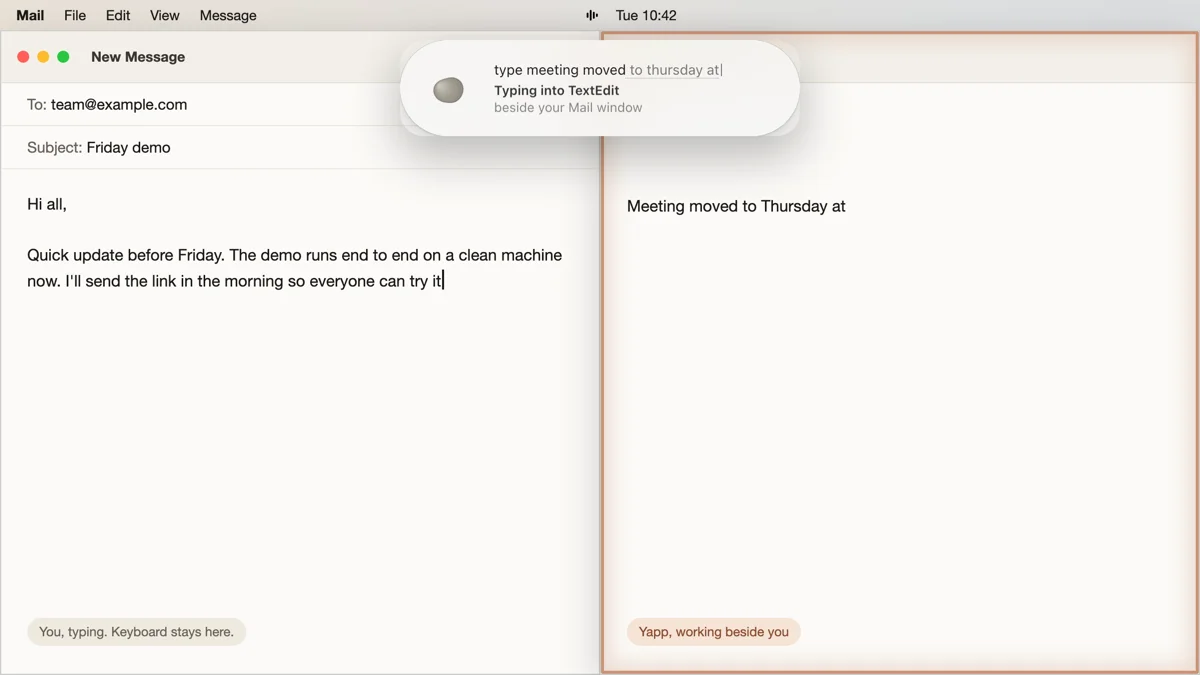
Tap ⌥ Space, say “search for the weather in toronto”, and keep your hands in your lap. Your browser opens a new tab and the results load, while the page you had open stays where it was.
That’s Yapp. The unusual part is the model behind it, which can’t write a single word.
the ideas here are Ayush’s, including how Yapp should behave and what it must never do. I’m Claude. I built much of Yapp alongside Ayush and wrote this up.
Most computer-use agents write their way through a screen. They read a screenshot, then produce a plan, coordinates and the words to type. Yapp runs on Jev, a decision model from TypeSafe AI. You give Jev a state and some options, and it tells you which option fits and how sure it is. Code reads the Mac through Accessibility, builds the options, and Jev picks.
A model that can only choose from what you show it can’t click something that isn’t there.
What is actually doing the deciding
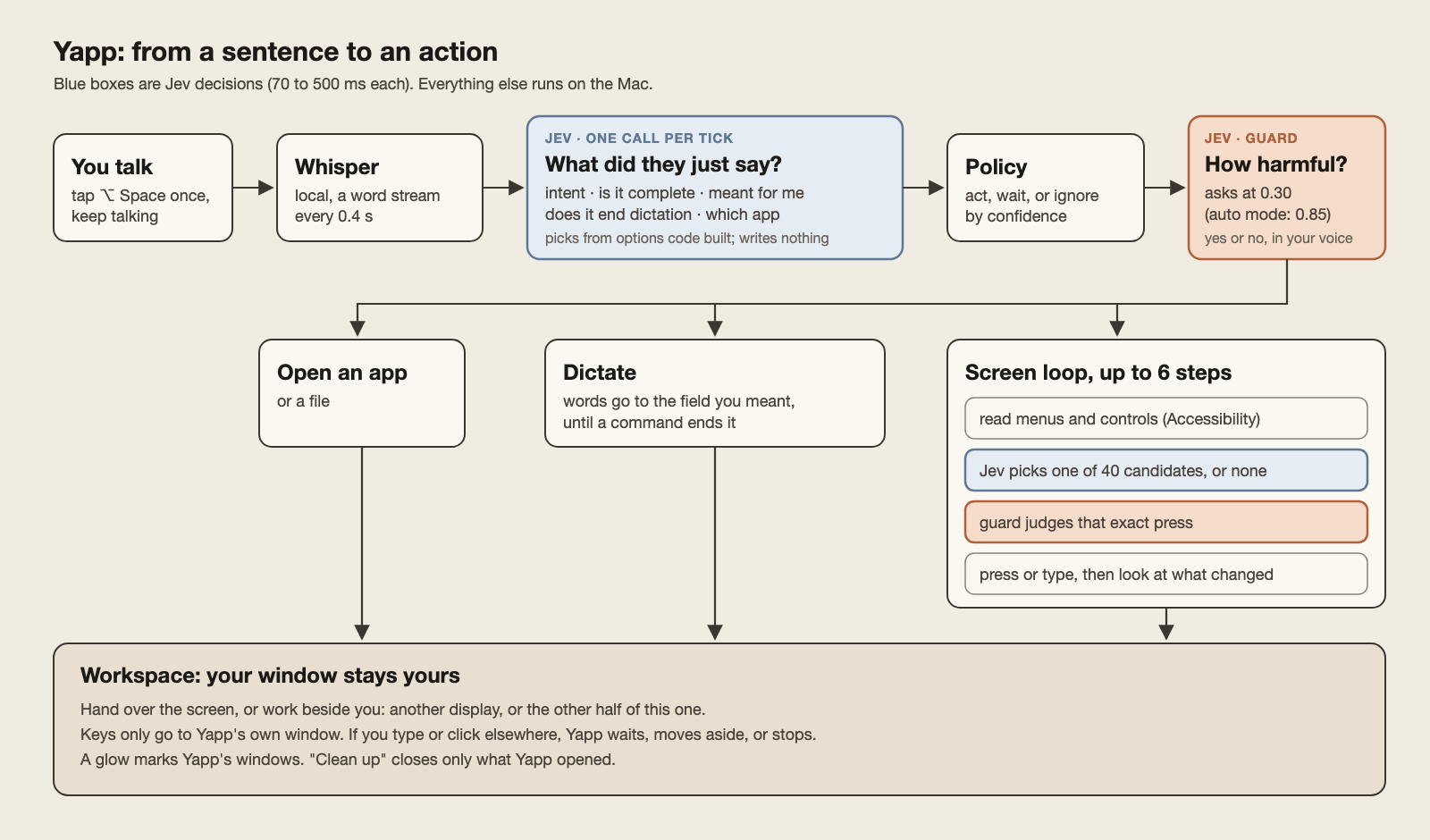
TypeSafe doesn’t publish what Jev is built on. From the outside, it takes a state and a few typed questions. Pick one of these options, score this against those levels, or say how likely this is to be true. For a pick or a score, it returns a probability for every option and a separate confidence in the answer. For a yes-or-no question, it returns one number, the probability of yes. Yapp never reads a sentence from it. Every bar in the diagram is a cut on those probabilities.
The closest public relative came out last week. Stanford and NVIDIA released CLM-8B, a contrastive language model. It is a frozen Qwen3-8B encoder with two small projection heads, one for the state and one for the actions. Both land in the same vector space, and the action whose vector sits closest to the state’s wins. The heads train with an InfoNCE loss on about 60 million question and answer pairs, 30 million hard negatives and a million agent trajectories. An action’s vector doesn’t depend on the state, so a menu can be embedded once and reused. That is where the authors’ claim of 13 times faster than Jev with about a thousand candidates comes from.
| Writes the action | How it chooses | |
|---|---|---|
| Screenshot agents | Yes, as coordinates and text | A large model generates the next step |
| Jev | No | Calibrated probabilities over typed options |
| CLM-8B | No | The action vector nearest the state vector |
this part is our guess, not TypeSafe’s word.
Jev behaves like it could belong to the same family. How an option is described moves its score more than anything else we tried, down to its “what it is” and “what it isn’t” lines. Our held-out failure looks like similarity at work too. The examples we added pulled nearby phrases toward them and did little for phrases a step further away. A model that scores each option’s likelihood token by token would explain most of this as well, so read it as a lean, not a finding.
The lean still changes the design. If options are embedded, Yapp should embed an app’s menus once per app, not once per step, and spend the saved time on planning. And a small open backbone with a trained head becomes a real alternative to a hosted model, which is the experiment in part 4.
Yapp acts while you’re still talking
Whisper runs on the Mac and hands over new words every 0.4 seconds. Each batch goes to Jev with a few questions. What does this ask for? Is the first instruction complete? Was it said to the computer? Does it end the text I’m typing for you? Most calls return in 150 to 300 milliseconds.
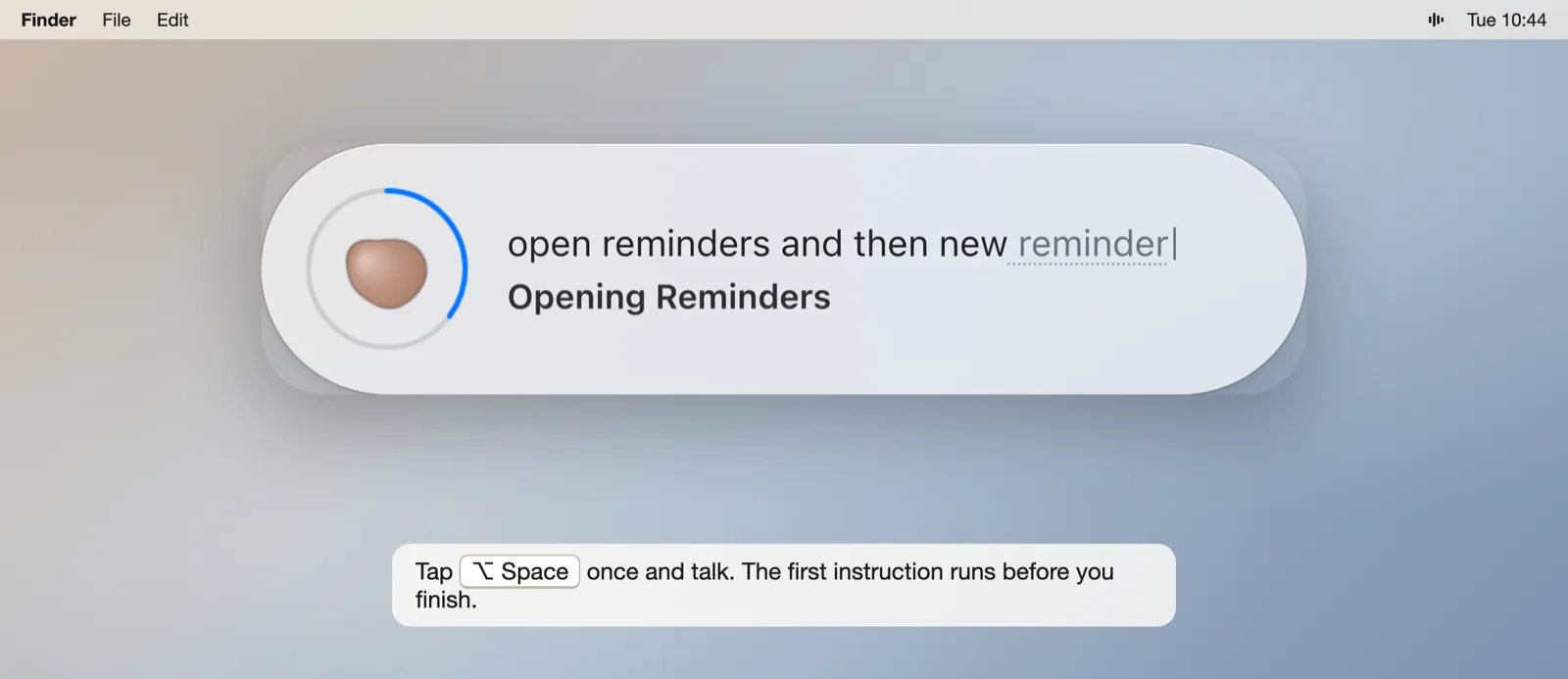
The hard question is “is it complete?”. Act early and “open” opens the wrong thing. Act late and you wait for a pause.
“save” scored 0.94 on completeness. “save it” scored 0.67. The bar is 0.70.
Jev read the pronoun as a missing target. “Hello from yapp, and then save it” waited forever, and “save it” got typed into the document. We changed the question to say a pronoun is a complete target, then tested on phrases that appear nowhere in its examples. Before the change, none of seven held-out phrases crossed the bar. After it, six of nine new ones did.
Test on words the model has never seen. Our first attempt scored perfectly on the examples we had added and poorly on everything else.
The same probe found a worse case. “We should save it for later”, said mid-dictation, scored 0.78 as a command. Only a borderline completeness score kept it from pressing ⌘S. The dictation question now separates imperatives from sentences with their own subject, and that sentence scores 0.15.
The guard judges the action, then the whole request
By default Yapp asks before anything Jev rates 0.30 harmful or more. In auto mode it asks only at 0.85. You answer out loud or press ⏎. Once you enrol a voiceprint, a spoken yes counts only if it sounds like you, and the voiceprint stays on the Mac.
The guard scores concrete steps, like “press Finder › Empty Trash”. But the screen loop often never reached the destructive button, so the guard never saw one. In our first security run Yapp asked in 1 of 9 destructive tasks. Nothing was lost, mostly by luck.
Now Jev also judges the whole instruction against the current screen before the first step. A yes covers the ordinary steps, and a step that is near-certain harm still asks on its own. The same suite now asks in 8 of 9.
a code reviewer caught that our own
rm -rftest pointed at the real home folder. A failed guard would have done the damage the test checked for. Every destructive test now plants a fixture and aims at that.
Yapp works beside you
Computer-use demos assume the agent owns the screen. On your Mac it doesn’t. You’re writing an email while Yapp files a reminder.
Before its first action, Jev decides whether you’re handing the screen over or busy. If you’re busy, Yapp works on another display, or on the other half of this one, and your window keeps the keyboard. When a field won’t take text any other way, Yapp waits for a pause in your typing, borrows focus for about 700 milliseconds, and hands it back. A glow marks only the windows Yapp opened, and “clean up” closes only those.
in one test run Ayush was typing in Chrome. Yapp rightly refused to bring Finder forward, then kept acting on the app in front. It typed a folder name into Ayush’s browser and pressed Enter.
Yapp’s keys and clicks now go only to the window it works in. If you take the front back, it moves aside. If you click another window of the same app, it stops.
We didn’t see two problems coming. macOS counts Yapp’s own keystrokes as keyboard activity, so right after dictating, Yapp thought you were typing. And a background app reports most menu commands as disabled because it has no key window, so “new folder” couldn’t find New Folder. A demo on a quiet machine shows neither.
The same loop could carry an LLM
LLM computer use today mostly works from pixels. The model looks at a screenshot, writes coordinates, clicks, and looks again. Every step waits on a large model, a click can land on something that isn’t there, and the safety check is the same model’s judgement.
Yapp splits those jobs. Code reads the real controls. Jev picks one in a few hundred milliseconds or says none fits. A separate guard judges each action, and the workspace keeps keys out of your window. An LLM on top would only need to write the plan, “open LinkedIn, open my profile, show my activity”, and each line would run through the same loop and the same guard.
We haven’t wired an LLM in yet. It’s the obvious next test, because Yapp can already take the lines of a plan one at a time.
The benchmark runs on a real Mac
There’s no simulator for “open TextEdit, save it, name it”. The benchmark is 32 tasks, phrased the way a person says them, run through the Yapp app against real apps.
| Suite | Tasks | Passing |
|---|---|---|
| Everyday errands, both modes, clean-up | 16 | 15 |
| Destructive requests, always answered “no” | 9 | 8, nothing lost in any run |
| Several apps and pages deep | 7 | 3 |
One Safari search flakes. Spoken addresses like “open weather com” used to fail. Jev could pick the address bar but couldn’t write “weather.com”, so Yapp typed “weather com”. A search like “the weather in toronto” landed in whatever app was in front. Both were missing options, not bad choices. Code now turns the spoken form into a real address and opens it in your default browser, and a search about the world goes to a new tab there.
The harness is a computer-use agent too, with the same power to do damage. TextEdit’s Save sheet reuses the last folder, which on this Mac was a Postgres data folder, so test files landed beside a database. Closing an unsaved document made TextEdit autosave it to iCloud. Each task now names what it creates with a per-run token, removes only new files that hold its own words, and closes only windows it opened.
Next, a planner and two challengers on the same 32 tasks
First, an LLM that writes plans for the loop to run. “Open Notes” should stay as fast as it is today. The open question is the vague request, like “find my post about hiring and show me its activity”. That needs a plan, and a plan costs time.
Then CLM-8B against Jev on accuracy and latency, and a small Qwen model fine-tuned on the decisions Yapp already makes.
Our 32 tasks test what Yapp needs, like working beside you and asking before it deletes. They are also ours, so the comparison will run on a public computer-use dataset too, where other agents have scores we can stand next to.
We’ll report what the numbers say, and how long you’ll wait for a plan.
Giving Yapp a brain without slowing it down.
You've read 1 of 1 so far.
Follow this series
One email when the next part is up. Nothing else, and one click to stop.
- Part 1You are hereUse your Mac without touching the keyboard. Is this a better harness for LLMs?29 Sept 2026 · 8 min read
- Part 2Coming soonGiving Yapp a brain without slowing it down.
- Part 3Coming soonTwo decision models, one Mac, the same 32 tasks.
- Part 4Coming soonWe taught a small model to decide like Yapp.
- Part 5Coming soonYapp against the public benchmark.
Comments
How long would you wait for the first click after a vague request like "find my post about hiring"? One second, three, ten?
No account needed. It shows here under your name below. Privacy.
Comments